
Elegoo Neptune 4 Pro 1

Elegoo Neptune 4 Pro

FDM Printer

Best Price
209,00 €
Brandasd
Print Speed

500

Enclosure

Open

Extruders amount

1

Layer Resolution

0.05

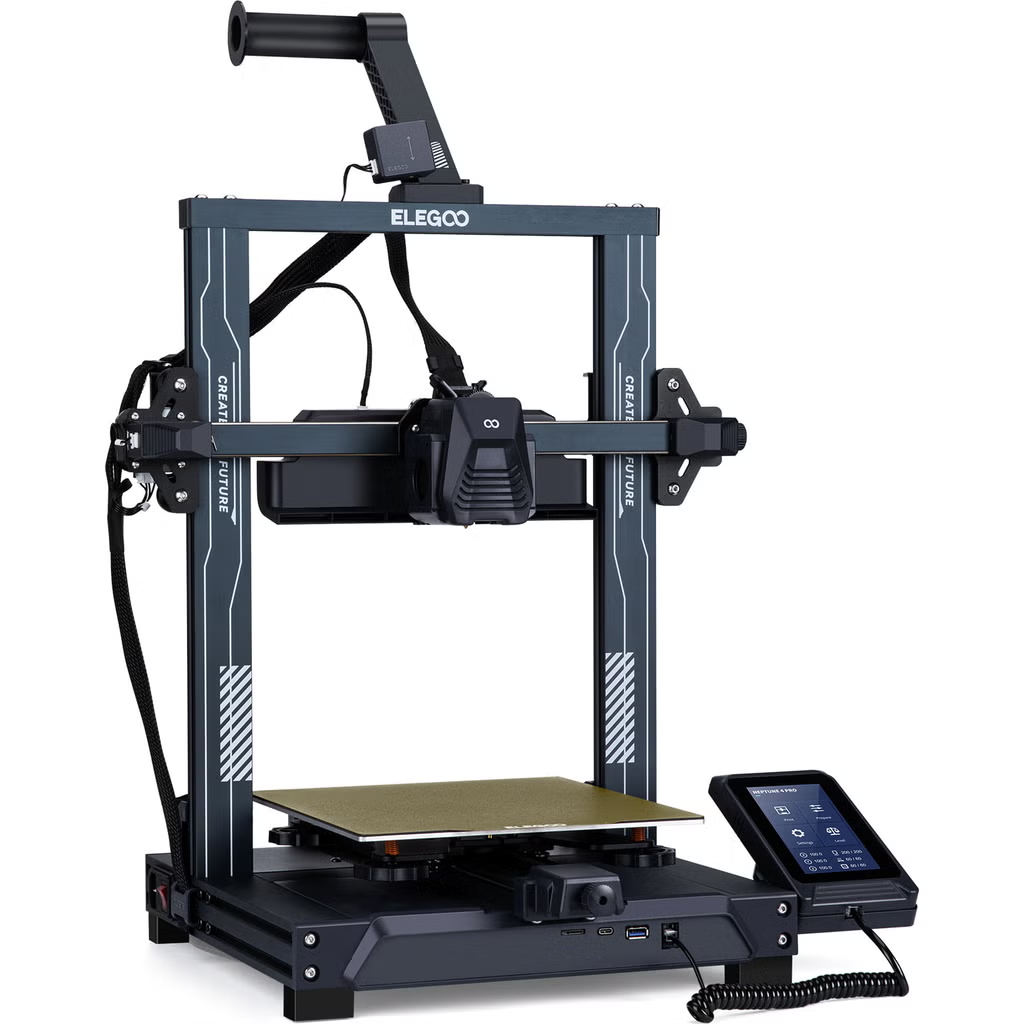
The Elegoo Neptune 4 Pro is a high-speed FDM 3D printer with max 500 mm/s speed, 225x225x265 mm build volume, Klipper compatibility, dual-gear direct drive extruder, and dual-zone 250W heated bed. It features automatic 121-point leveling, powerful cooling with multiple fans, 300°C hotend, and smart features like filament detection and resume printing. Weighing 8.9 kg, it supports USB and LAN interfaces, with a detachable 4.3-inch touchscreen. Ideal for beginners and experts, it delivers precise prints in materials like PLA, ABS, TPU, and nylon. Current best price at 209€ with 35% discount.
Prices & Deals
Affiliate
3DJake Logo
Shipped from: DE
Affiliate
Amazon DE Logo
Shipped from: DE
ELEGOO EU Logo
  1. Neptune 4 Pro - Ribbon-Cable Version
  2. Neptune 4 Pro - Type-C
Shipped from: DE
Last Updated: 07.04.2026

Product Description

Elegoo Neptune 4 Pro: Blaze Through Prints at 500mm/s with Pro-Level Precision

Unlock the future of fast, reliable 3D printing with the Elegoo Neptune 4 Pro. This powerhouse FDM printer hits speeds up to 500 mm/s, powered by Klipper firmware and a silent ARM 64-bit quad-core motherboard. Imagine slashing print times without sacrificing quality – that's the Neptune 4 Pro edge. Its dual-gear direct drive extruder handles PLA, ABS, TPU, and more with ease, while the smart dual-zone heated bed saves energy by heating only what you need. With a generous 225x225x265mm build volume, automatic leveling over 121 points, and advanced cooling, it's built for hobbyists and pros alike. At the best price of 209€ (down from 319.99€), this is your ticket to high-speed creativity. Compared to older models, it adds all-metal rails and a sturdier frame for unmatched stability. Don't miss out – elevate your printing game today.

  • Blazing Speed: Up to 500 mm/s with recommended 250 mm/s for optimal quality.
  • Generous Volume: 225x225x265 mm build space for larger creations.
  • Smart Heating: Dual-zone 250W bed (100W + 150W) for energy efficiency.
  • Precise Extrusion: Dual-gear direct drive with 5.2:1 ratio and 300°C hotend.
  • Advanced Cooling: 4x 4020 and 2x 4015 fans with intelligent control.
  • Auto Leveling: 121-point sensor for hassle-free setup.
  • Connectivity: USB, LAN, and optional WLAN for remote access.
  • Durable Build: All-metal frame and rails for stability.
  • User-Friendly: Detachable 4.3-inch touchscreen with multi-language support.
  • Safety Features: Filament detection and power resume.

Who Is the Elegoo Neptune 4 Pro For?

If you're diving into 3D printing or upgrading from basic setups, the Elegoo Neptune 4 Pro fits perfectly. It's designed for hobbyists who crave speed without complexity, makers tinkering with prototypes, and educators teaching STEM concepts. Beginners appreciate the easy assembly and auto-leveling, while experienced users love the high-temp hotend and Klipper tweaks for custom projects.

  • Speed Enthusiasts: Hit 500 mm/s for quick prototypes.
  • Material Experimenters: Supports diverse filaments like nylon and TPU.
  • Energy Savers: Dual-zone bed reduces power use.
  • Remote Managers: LAN printing for easy monitoring.
  • Quality Seekers: All-metal components ensure durability.

This printer bridges entry-level ease with pro features, making it ideal for home workshops or small businesses pushing creative boundaries.

In today's fast-evolving 3D printing landscape, the Elegoo Neptune 4 Pro stands out by building on legacy models with enhanced speed and efficiency. Unlike earlier versions limited to slower paces, this Pro iteration integrates Klipper for seamless high-speed operation, all-metal construction for longevity, and smart energy features like dual-zone heating. It addresses common pain points in older gear, such as inconsistent cooling and higher power draw, making it a smart upgrade for users seeking reliability without breaking the bank. As printing tech advances, this model keeps you ahead with future-proof specs at the best price.

Review: Hands-On with the Elegoo Neptune 4 Pro's Speed Demon Performance

Diving straight in, the Elegoo Neptune 4 Pro feels like a premium upgrade in the budget realm – sturdy all-metal build gives it a pro vibe without the heft. Setup is beginner-friendly, taking 2-3 hours with clear instructions, making it accessible for skill levels from novice to expert.

On print performance, it's a beast: 500 mm/s max speed delivers benchy boats in record time, with quality holding up at 250 mm/s. The dual-zone bed and auto-leveling ensure consistent adhesion and minimal failures, while the cooling system keeps layers crisp even in high-speed runs. Feel-wise, it's responsive via the handheld touchscreen, though fans can get noisy during intense prints – best for dedicated spaces. For hobbyists, it's a joy, handling PLA flawlessly and venturing into TPU with ease. Overall, it punches above its weight, blending speed, precision, and smart features for addictive printing sessions.

  • Smooth Operation: All-metal rails reduce vibrations for cleaner prints.
  • Beginner Ease: Auto features lower the entry barrier.
  • High Output: Quick heat-up and recovery boost efficiency.
  • Versatile Materials: Tackles tough filaments without mods.
  • Quiet Potential: Silent mode for calmer environments.

Technical Breakdown: Inside the Elegoo Neptune 4 Pro's High-Speed Engine

Let's geek out on what makes the Elegoo Neptune 4 Pro tick. At its core is an ARM 64-bit quad-core processor clocked at 1.5GHz, running Klipper firmware for whisper-quiet, lightning-fast moves up to 500 mm/s. The dual-gear direct drive extruder, lighter by 25% than predecessors, delivers a 5.2:1 ratio for precise filament control – perfect for hobbyists crafting detailed models without jams.

The all-metal linear rails on X and Y axes minimize friction, ensuring smooth, accurate prints. That 250W heated bed? It splits into 100W and 150W zones, auto-detecting model size to heat efficiently and hit 110°C fast. Cooling is no joke: four 4020 fans and two 4015 blowers dissipate heat intelligently, shutting off post-print to save energy and reduce noise.

For setup, the 121-point auto-leveling sensor nails bed alignment every time. Add in the 300°C hotend with extended nozzle for better melt flow, and you've got a machine ready for PLA to nylon. It's engineered for reliability, with features like filament sensors and resume printing keeping your projects on track.

undefined

Pros & Cons: Weighing the Elegoo Neptune 4 Pro's Strengths

This high-speed printer excels in value and performance, but like any tool, it has trade-offs. Here's a balanced look to help you decide.

ProsCons
Blazing 500 mm/s speed with KlipperCan be noisy during high-speed prints
Dual-zone bed for energy savingsLimited spare parts availability initially
Easy auto-leveling and setupRequires occasional rail maintenance
Versatile material support up to 300°COlder included slicer version
Sturdy all-metal constructionSlightly heavier at 8.9 kg

📦 Package contains
  • 1x Elegoo Neptune 4 Pro Printer (kit form)
  • 1x Magnetic PEI Build Plate
  • 1x Detachable 4.3-inch Touchscreen
  • 1x Power Supply and Cable
  • 1x USB Cable
  • 2x Spare Nozzles (0.4mm)
  • 1x Tool Kit (screwdrivers, cutters, etc.)
  • 1x Sample Filament
  • 1x User Manual
  • 1x Grease for Rails

Product Attributes
Extruder Type

Direct Drive

Bed Leveling

Automatic

Heated Bed

Max Power Consumption

350W

Software

Cura, PrusaSlicer, Simplify3D

Print Speed

500

Enclosure

Open

Extruders amount

1

Layer Resolution

0.05


🤔 FAQ: Frequently Asked Questions
  • What makes the Elegoo Neptune 4 Pro faster than older models?

    It crushes with a 500mm/s max speed thanks to the ARM 64-bit quad-core mainboard and Klipper firmware that optimize motion control. Unlike legacy printers stuck at 100-200mm/s, this beast uses advanced algorithms for precise, vibration-free acceleration. Dual-gear extruder ensures filament flows smoothly at high velocities, while powerful cooling prevents overheating. Users report halving print times without quality loss—perfect for rapid prototyping. Just dial in 250mm/s for everyday excellence.

  • How does the dual-zone heated bed save energy?

    This smart bed splits into 100W and 150W zones, heating only what's needed based on model size. Activate intelligent mode in your slicer—it auto-detects and powers just the required area, slashing electricity use by up to 50% on small prints. Manual control via touchscreen lets you override for custom setups. Compared to single-zone beds that waste power heating the whole plate, this feature keeps costs down while reaching 110°C fast. Users love it for efficient, eco-friendly operation without compromising adhesion.

  • Is the Neptune 4 Pro suitable for beginners?

    Absolutely—it's a no-brainer for newbies with quick assembly, auto-leveling on 121 points, and an intuitive detachable touchscreen. Reviews highlight out-of-box perfect prints, even for first-timers. The included tools and sample filament get you started fast, and filament sensor prevents common failures. While it has pro features like high-speed printing, the user-friendly interface and Klipper presets make it forgiving. Pros note it's stable enough to learn on without frustration, outperforming basic printers in ease and results.

  • What materials can I print with the Neptune 4 Pro?

    Go wild with PLA, ABS, TPU, Nylon, and more—the 300°C high-temp hotend handles them all. The extended melt zone ensures even extrusion, reducing clogs on abrasive filaments. Dual-gear extruder provides the force needed for flexible materials like TPU without slippage. Users print everything from rigid prototypes to flexible parts seamlessly. Just ensure proper settings in your slicer for best results; it's versatile enough to beat limitations of lower-temp printers, opening doors to advanced projects.

  • How noisy is the Neptune 4 Pro during operation?

    It's loud at full 500mm/s due to high-RPM fans (up to 11,000), but intelligent controls shut them off post-print for silence. Reviews mention it's not living-room friendly during high-speed runs, but mute mode tones it down for quieter operation. The silent mainboard reduces overall noise compared to older models. Place it in a dedicated space or enclosure to minimize disturbance—users say the speed gains outweigh the sound, especially with vibration damping features keeping things steady.

  • Does the Neptune 4 Pro support remote printing?

    Yes, LAN connectivity lets you control and monitor via web terminal from anywhere. Upload files, start prints, and watch progress remotely—perfect for long jobs. It beats USB-only printers by adding flexibility without optional WiFi modules. Reviews praise the seamless integration, with resume printing handling power outages. The 8GB onboard storage holds hundreds of models, making it a set-it-and-forget-it machine for busy makers.

  • What maintenance does the Neptune 4 Pro require?

    Keep it running smooth by greasing the all-metal rails regularly—included lubricant helps. Clean the PEI bed after prints for longevity, and check belts with easy tensioners. Users recommend updating firmware for optimal performance and swapping nozzles (spares included) as needed. The design minimizes wear with durable components, but periodic checks prevent issues. It's low-maintenance compared to finicky older printers, with reviews noting reliable operation after hundreds of hours.

  • How does auto-leveling work on this printer?

    A non-contact sensor scans 121 points (11x11 grid) automatically, creating a precise bed mesh for even first layers. Choose manual or auto mode—it's fast and boosts success rates by compensating for any bed warp. Reviews call it a game-changer, eliminating trial-and-error leveling common in legacy machines. Just tap the screen, and it's done in minutes, ensuring consistent adhesion across the 225x225mm plate.

  • Can I use standard filament with high-speed printing?

    Totally—normal PLA works fine at 250mm/s, as per user tests. For max 500mm/s, high-flow filaments help, but the powerful extruder and cooling handle standard ones without issues. Reviews confirm great results with ecoPLA or basic ABS, no need for special 'high-speed' stuff unless pushing extremes. Adjust slicer settings for flow and temp to match, and you're golden—versatile and cost-effective.

  • What's the build quality like on the Neptune 4 Pro?

    Rock-solid with all-metal frame, linear rails, and dual Z-motors for stability. It weighs 8.9kg, feeling premium despite the kit assembly. Users rave about the durable construction, with wider Y-axis for smoother moves and LED lights for visibility. It outperforms plastic-heavy predecessors in longevity, handling high-speed vibrations without wear. Assembly is straightforward, and the modern design looks pro—definitely built to last for serious printing.

  • What makes the Elegoo Neptune 4 Pro faster than previous models?

    The Neptune 4 Pro ramps up to 500 mm/s thanks to its Klipper firmware and powerful ARM 64-bit processor. This combo optimizes motion control for precision at high speeds, unlike older Marlin-based printers that cap out lower. Users report slashing print times in half while maintaining quality – it's a game-changer for rapid prototyping.

  • Is the Elegoo Neptune 4 Pro suitable for beginners?

    Absolutely, it's beginner-friendly with easy assembly, auto-leveling over 121 points, and intuitive touchscreen controls. Reviews highlight how newcomers get perfect prints out of the box, though some tweaking in slicers like Cura helps. No advanced skills needed to start, but it scales for experts too.

  • What filaments work best with the Elegoo Neptune 4 Pro?

    It supports a wide range including PLA, ABS, TPU, and nylon, thanks to the 300°C hotend and direct drive extruder. Users successfully print with standard PLA at high speeds without special high-speed filaments, though optimizing flow rates ensures best results. Experiment freely for your projects.

  • Can I monitor prints remotely with the Elegoo Neptune 4 Pro?

    Yes, LAN connectivity lets you control and monitor via a web terminal from anywhere on your network. It's seamless for checking progress without being at the printer, and optional WLAN expands options. Users love this for multi-tasking in home setups.

  • What about noise levels during printing?

    It's equipped with a silent motherboard, but high-speed cooling fans can get loud at peak – around 50-60 dB. Reviews suggest placing it in a separate room or using mute mode for quieter operation. Post-print, fans auto-shutoff to minimize disturbance.

  • How durable is the build of the Elegoo Neptune 4 Pro?

    With an all-metal frame and linear rails, it's built to last, offering better stability than plastic-heavy predecessors. Users report smooth movements even after hundreds of hours, with easy maintenance like greasing rails keeping it running like new.

  • Does it come with everything needed to start printing?

    The kit includes the printer, PEI plate, tools, spare nozzles, and sample filament – enough for your first print. Order extra filament for ongoing use, as the sample is small. Assembly is straightforward, and it's ready to go after leveling.

  • What slicer software is recommended for the Neptune 4 Pro?

    It works great with Cura, PrusaSlicer, or OrcaSlicer, supporting STL and OBJ formats. The included Cura version is older, but updating to the latest yields better high-speed profiles. Users tweak settings for optimal 250 mm/s prints without issues.

  • How does it compare in specs to the standard Neptune 4?

    The Pro adds dual-zone heating, all-metal rails, and a metal top beam for enhanced durability and efficiency. Both share 500 mm/s speed and Klipper, but the Pro's upgrades make it sturdier for demanding prints at the best price point.

Elegoo Neptune 4 Plus2 Offers
from 289,00 €
Elegoo Neptune 42 Offers
from 179,00 €
Elegoo Neptune 4 Max4 Offers
from 369,00 €

Elegoo Neptune 4 Max4 Offers
from 369,00 €
Elegoo Neptune 42 Offers
from 179,00 €
Elegoo Neptune 4 Plus2 Offers
from 289,00 €
Bambu Lab A1 Combo4 Offers
from 369,00 €
VERIFIED PARTNERS

Many of our partners are verified by the manufacturers
SECURE PAYMENT

Our partners provide various verified payment methods

FAST SHIPPING

Fast handover to the shipping service within 24 hours with many partners

GROWING COMMUNITY

3D Printing and Scanning is enjoying growing enthusiasm all over the world